Your Code Survives the Session. Your Reasoning Doesn't.

Everyone talks about what AI produces. Few talk about what you learn while producing it — the reasoning, the dead ends, the corrections, and the concepts that finally click during a session.
That learning is where the real value lives. And unless you capture it, it disappears the moment you close the session.
This isn’t just about code. Some of the most valuable AI sessions produce no code at all. You spend thirty minutes asking Claude to explain how hooks work, or walk you through a concurrency pattern, or compare two architectural approaches. By the end, you understand something you didn’t before. Then you close the session and within a week, the nuance is gone — you remember that you learned something, but not the specifics that made it click.
This post walks through a journaling system I built with Claude Code to solve that problem. It’s simple — a markdown skill, a hook, and a directory. But the thinking behind it matters more than the implementation, because it reveals something fundamental about working with AI: the output is always durable; the learning is durable only if you make it so.
The problem: ephemeral reasoning
Here’s the asymmetry at the heart of AI-assisted development.
Say you’re a developer at Shiba Resorts, a Hawaiian vacation platform. You’re building the booking service — the system that handles reservations, availability checks, and payment confirmation. You ask Claude Code to generate a function that updates room availability after a booking is confirmed.
Claude produces a clean confirm_booking() function. It looks good — well-structured, handles edge cases, passes your tests. But during the team demo, the booking page hangs for two minutes after a guest confirms. No spinner, no feedback, nothing. The function works, but Claude buried a synchronous API call inside it — it waits for the payment gateway to respond before releasing the thread. You catch it, refactor to a two-step pattern (confirm first, process payment in the background), and commit the fix.
Clean code in the repo. Lesson learned.
Then you /clear the session and move on to the next thing.
Three weeks later, you’re building the concierge chatbot — a different service in the same platform. You ask Claude to generate a function that checks excursion availability. Claude produces a check_availability() helper that — you guessed it — makes a blocking API call to the excursion provider and waits for the response before returning. Same pattern. Same failure mode. But you’ve forgotten the booking service encounter. The git diff from three weeks ago shows that confirm_booking was refactored, but it doesn’t show why — the two-minute hang, the debugging session, the insight that Claude tends to hide blocking calls inside clean-looking helpers.
You re-learn the lesson from scratch.
Git captures what changed. Journals capture why — and what you tried first.
What actually gets lost
Three things destroy session context in Claude Code:
/clearwipes the conversation entirely- Context compaction summarizes early reasoning away when the context window fills up
- Session end — you close the terminal, and whatever you didn’t write down fades within days
In each case, the code is safe. But two things vanish.
First, the correction loop — the part where you steered the agent, rejected bad approaches, and discovered failure patterns. That loop is where you develop judgment about working with AI.
Second, the learning itself. Not every session is about building. Sometimes you’re exploring a new tool, asking questions about an unfamiliar API, or working through a concept until it clicks. Those sessions produce understanding, not artifacts — and understanding has no commit history.
After enough sessions, you start recognizing LLM behavior patterns by feel. Agents tend to collapse multi-step operations into opaque wrappers. They overclaim safety properties (“this is idempotent” — it isn’t). They mimic nearby patterns inconsistently. These insights are invisible in any single session but obvious across many — if you’ve been writing them down.
The solution: a skill and a hook
Claude Code has two primitives that make this work: skills and hooks. They play different roles. The skill gives you a structured journaling command. The hook makes sure you don’t forget to use it.
Skills: a job description for Claude
A skill is a markdown file that teaches Claude how to perform a specific task. Think of it like a job description for a coworker — instead of explaining the same procedure every time, you write it down once, and Claude follows it automatically whenever you invoke it.
When you type /journal, Claude reads the skill file and follows its instructions — generating a structured entry from the current session, saving it to a known location, and confirming what was captured.
The skill is just a file called SKILL.md. The one that matters here is the personal global skill:
~/.claude/skills/journal/SKILL.mdA skill at ~/.claude/skills/ is automatically available in every Claude Code session, in any directory, on any project. No registration, no configuration reference, no setup. Create the file and it works everywhere.
By default, Claude can also invoke skills on its own when it thinks they’re relevant. For a journal skill, you want manual control — you decide when to journal, not the model. Adding disable-model-invocation: true to the skill’s frontmatter ensures only you can trigger it with /journal.
Hooks: a reminder after compaction
The problem with a manual /journal command is that you have to remember to run it. You won’t — not when you’re deep in a problem and ready to move on.
Hooks help. They’re commands that fire at specific lifecycle events in Claude Code, configured in settings.json. But not every hook event works the same way. This matters for journaling, because the moments when you most want a reminder — right before context is lost — are also the moments with the least interactive control.
Here’s what the relevant hook events actually support:
| Event | When it fires | Can Claude see the output? | Can it pause the action? |
|---|---|---|---|
SessionStart | When a session begins or resumes | Yes — stdout is added as context | No |
PreCompact | Before context compression | No — stdout is verbose-only | No |
SessionEnd | When you run /clear | No — stdout is verbose-only | No |
The critical detail: as of early 2026, only SessionStart and UserPromptSubmit hook output gets added as context that Claude can see and act on. PreCompact and SessionEnd hooks are for side effects — logging, backups, cleanup — not interactive prompts. (Check the hooks reference for the latest behavior.)
This shapes the design. You can’t have Claude ask “want to journal?” right before /clear or compaction. Those hooks can’t inject conversation context.
What does work: SessionStart with a compact matcher. After the context is compacted, Claude resumes the session and the SessionStart hook fires. Its output is added to context. Claude sees the reminder, still has a summary of the previous conversation, and can suggest running /journal.
Context window fills up
  → PreCompact hook fires (side effect only — e.g., log the event)
  → Context is compressed
  → SessionStart(compact) hook fires
  → Hook output becomes context: "Session was just compacted..."
  → Claude sees the reminder and suggests: "Want to run /journal?"
  → You say yes → Claude generates a structured entry
  → Entry is saved to ~/.claude/journals/
For /clear, there’s no equivalent hook that can remind you before the wipe. The SessionEnd hook fires, but it can’t add context for Claude to act on — the session is ending. The honest answer: journal before you clear. Make /journal then /clear a two-step habit. The hook can’t save you here; the discipline is yours.
Building the skill
Here’s the global skill. Create it at ~/.claude/skills/journal/SKILL.md:
---
name: journal
description: Capture a structured learning journal from the current session
disable-model-invocation: true
---

# /journal - Session Learning Journal

Capture a structured learning journal entry from the current session.
Journals are saved to ~/.claude/journals/ so they persist across all projects.

## When This Skill Is Triggered

- Manually: User types /journal
- After compaction: SessionStart hook adds a reminder — ask the user
  yes/no before proceeding

When triggered after compaction, always ask:
> Would you like me to create a journal entry for this session?

If the user says no, skip.

## Execution

### Step 1: Evaluate the session
- If the session was trivial (< 3 substantive exchanges), suggest skipping
- Otherwise, summarize what would be captured and ask yes/no

### Step 2: Determine context
- Project: current working directory / project name
- Date: today's date
- Title: 3-5 word summary of the session

### Step 3: Generate the entry

    ---
    date: YYYY-MM-DD
    project: [project-name]
    topics: [topic-a, topic-b]
    ---

    # YYYY-MM-DD | [Brief Title]

    ## What I worked on
    [1-2 sentences]

    ## What I learned
    [Key insights — be specific, not generic]

    ## Key Decisions
    | Decision | Rationale | Outcome |
    |----------|-----------|---------|
    | ... | ... | ... |

    ## Failures
    [What went wrong, what the agent got wrong, what you corrected.
     This is often the most valuable section.]

    ## Aha Moments
    [Insights you'd tell a colleague over coffee]

    ## Open questions
    [Unresolved items for next time]

### Step 4: Save
- Directory: ~/.claude/journals/
- Filename: YYYY-MM-DD-brief-title.md (lowercase, hyphens)
- If filename exists, append counter: YYYY-MM-DD-brief-title-2.md

### Step 5: Confirm
Show the user: title, project, topics, and the file path.

## Output Rules
- Be specific — generic insights aren't useful
- Capture the "why" not just the "what"
- Write in the user's voice — first person, concise
- Always include Failures if anything went wrong
- Include the project name so entries are traceable
Two things about this template are intentional.
First, it requires a Failures section. This is the most valuable part of any journal entry — what the agent got wrong and how you caught it. “Claude buried a blocking API call inside confirm_booking” is worth more than “I built the booking service.” If nothing failed, say so. But that section should always be there.
Second, the YAML frontmatter with project and topics fields makes entries more consistent and precise when you search later. grep works on any text, but structured frontmatter means you can reliably filter by project or topic without false positives.
Everything else is flexible. Skip sections that don’t apply. Keep entries short. The goal is a two-minute capture, not a formal report.
Configuring the hook
Add this to your ~/.claude/settings.json:
{
  "hooks": {
    "SessionStart": [
      {
        "matcher": "compact",
        "hooks": [
          {
            "type": "command",
            "command": "echo 'Your context was just compacted. If the previous conversation contained valuable insights worth preserving, consider running /journal to capture them before the nuance fades further.'"
          }
        ]
      }
    ]
  },
  "permissions": {
    "allow": [
      "Write(~/.claude/journals/**)"
    ]
  }
}
The mechanics are covered in the section above — "compact" matcher, SessionStart context injection. The one new piece here: the permissions.allow entry lets Claude write to your journals directory without prompting for approval each time.
What about /clear?
You might want a reminder before /clear too. The SessionEnd hook fires when you clear, but its output doesn’t get added as Claude’s context — it’s a fire-and-forget event for cleanup tasks. You can use it for automatic side effects (like logging that a session ended), but not for interactive prompting.
The practical answer: make /journal → /clear your habit. Before you clear a session, ask yourself: did I learn anything? If yes, type /journal first. Two keystrokes, thirty seconds.
The complete setup
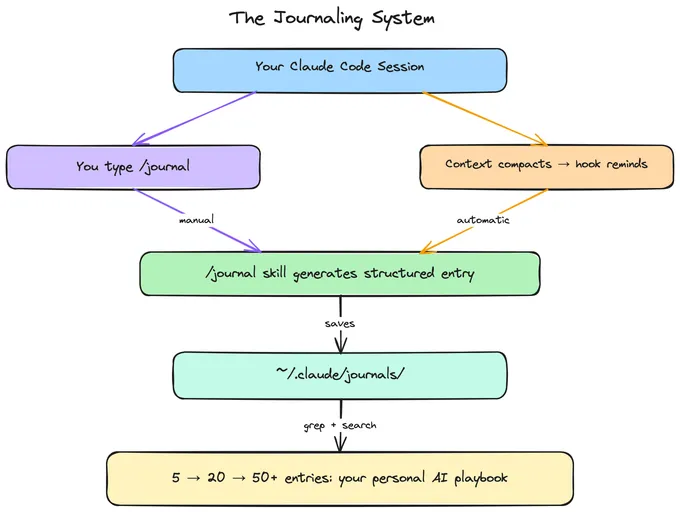
Three things to create: the skill file at ~/.claude/skills/journal/SKILL.md, the journals directory, and the hook config in ~/.claude/settings.json. Use the templates from the sections above.
mkdir -p ~/.claude/skills/journal
mkdir -p ~/.claude/journals
# Write SKILL.md and merge the hook config into settings.json
That’s the whole system. The next time your context is compacted, Claude will suggest journaling. And before you /clear, you’ll type /journal first — because now you know what you’d lose if you didn’t.
What compounds
A single journal entry is useful. A collection of them is transformative.
A handful of entries and you start recognizing LLM failure modes by feel. A month of entries and you’ve developed prompting strategies tailored to how your agent tends to fail. Keep going and you have a personal playbook for AI-assisted development that no documentation can replace.
# What have I learned about blocking calls?
grep -r "blocking" ~/.claude/journals/

# What has Claude gotten wrong?
grep -r "Failures" -A 5 ~/.claude/journals/

# Everything from the booking service
grep -rl "booking" ~/.claude/journals/
The patterns that emerge aren’t ones you’d find in documentation:
| Pattern | How you discover it |
|---|---|
| Agents bury blocking calls inside clean helpers | The booking hang and the excursion hang were the same mistake — your third journal entry about it makes the pattern undeniable |
| Agents overclaim safety properties | Claude called confirm_booking idempotent. You ran it twice. The guest got double-charged. Now you verify every safety claim |
| Agents mimic nearby patterns inconsistently | You notice the booking service uses try/catch in one function and silent returns in the next — same file, written in the same session |
These aren’t bugs in the model. They’re the nature of working with probabilistic systems. Naming them — “hidden blocking,” “overclaiming,” “pattern inconsistency” — makes them easier to spot in real time.
The skill this builds: reviewing AI output is adversarial reading. You’re not proofreading. You’re looking for things that sound right but aren’t. Journaling is deliberate practice for that skill.
What this doesn’t solve (yet)
This setup is intentionally simple. Everything goes to ~/.claude/journals/ — one directory, one machine, no git. That’s the right starting point, but it has limits:
- Journals are machine-local. They don’t sync across devices or survive a machine wipe. If that matters, you’ll want to back them up or move to a git-backed directory.
- No separation between project-specific and cross-cutting insights. A debugging entry about one codebase sits next to a general insight about LLM behavior. As the collection grows, you might want to route entries differently based on their type.
- The
/clearboundary is unguarded. The compaction hook catches one loss vector, but clearing is still on you. ASessionEndhook can log that you cleared without journaling, which helps build awareness — but it can’t pause the clear to ask.
These are all solvable. Claude Code’s skill hierarchy supports project-level skills that override the global one, which means you can evolve the system without rebuilding it. And as the collection grows past what grep can comfortably navigate, you might want a tool like Obsidian for graph-based navigation, backlinks, and tag-based discovery. More on that in a future post.
Start with the simple version and see what friction you actually feel.
The deeper point
This isn’t really a post about journaling. It’s about a gap in how most people work with AI.
We focus on what AI produces — the code, the output, the artifact. We optimize prompts to get better outputs. We evaluate outputs against benchmarks. The entire feedback loop is oriented around the product of the interaction.
But the interaction itself is where you get educated. The corrections, the dead ends, the surprising behaviors, the thirty-minute exploration session where a concept finally clicks — that’s the training data for you. AI doesn’t just accelerate building. It accelerates learning. But only if you capture what you learned.
The LLM resets every session. Your journals don’t.
If you’re working with AI, the most valuable thing you can capture isn’t the code. It’s the understanding — the reasoning that produced the code, the thinking that rejected the first three versions of it, and the concepts you explored in sessions that produced no code at all.
Start local. Journal manually for a week. Notice what you capture and what you wish you’d captured. Then add the hook so you stop forgetting after compaction. Then, a month in, grep through your journals and see what patterns emerge.
The code is the output. The journal is the education.
If you’re building with AI and care about developing judgment alongside developing software, I’d love to hear how you approach this. Find me @gcdaii on X.
continue reading
Building the AI-Ready Data Platform
Agents don't fail because the model is wrong. They fail because the data platform wasn't built for them. Here's what an AI-ready data layer actually looks like — and proof it works.
Data Is the Bottleneck in the Agentic Era
Good data yields good agents — and agents can produce far more decision data than humans ever did. The data layer is about to become the most critical piece of the stack.
Starting Over, on Purpose
Why I rebuilt this site from scratch — and what I plan to explore next.