The sixth tab

On this page
Your AI assistant gave a great demo. Six months later people use it every week, and they say it helps. The usage chart goes up.
But watch someone handle a customer problem. They ask the assistant, and it pulls up the account, the open tickets and the last email in seconds. Then the work starts. The refund is issued in Zendesk. The manager approves it in Slack. The decision about the renewal is made on a Zoom call, and someone types the outcome into Salesforce. The assistant helped them find things. The work still happens across the same five tools. The assistant is the sixth.
That’s the gap a usage chart can’t show. It tells you people find the assistant useful. It doesn’t tell you whether their work got simpler. Useful and simpler aren’t the same thing, and the business case was built on simpler: time saved on every task.
I think this is one of the most common ways enterprise AI stalls, and it’s easy to miss because the chart looks fine.
It isn’t a model problem. The model was good. The answers were good. The assistant just became one more place to look.
Here’s what I’ve come to believe:
- People adopt a tool that makes their day simpler. Simpler means fewer tools to open, not one more.
- Usage tells you an assistant is useful. To see whether work got simpler, count places per task: the number of different tools one person opens to finish one task.
- The fix isn’t one screen for everyone. It’s one shared record, shown to each person in the tool they already use.
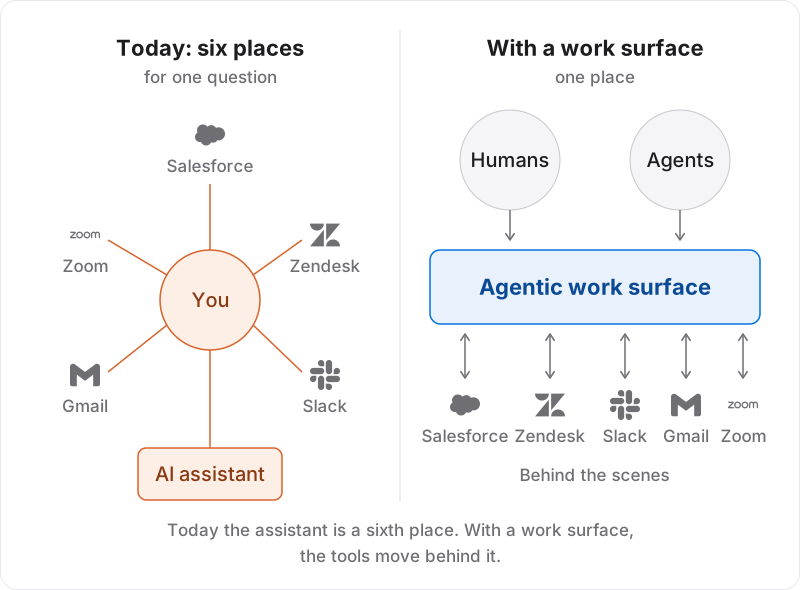
People connect the tools by hand
Digital transformation gave every team its own system: sales, support, finance, HR. Each one holds the facts for its part of the business.
It also gave everyone tools for working together: Slack, Gmail, Zoom. That’s where the decisions get made.
The two never meet. The systems hold the facts but not the conversation. The collaboration tools hold the conversation but not the facts. A discount agreed in a Slack thread on Tuesday isn’t in Salesforce on Wednesday, unless someone types it in.
So a person does the joining. To answer one ordinary question about a customer, they open Salesforce, then Zendesk. They search Slack for the thread, Gmail for the email, and Zoom for last week’s call notes. Then they put an answer together.
The slow part isn’t the worst part. The worst part is that the work is thrown away. The next person starts from the same scattered tools and does it all again.
Agents inherited the same job
A popular answer today is to let every team build its own agent. I think that’s a mistake. It’s an easy one to miss, because each agent looks good on its own.
Ask an agent what’s happening with a customer. It reads the same scattered tools, puts the same picture together and gives a good answer. Some assistants now remember what they learned, but that memory belongs to one user in one product. The next person can’t read it, and neither can another team’s agent. So the picture gets built again and again, a little differently each time, with slightly different answers.
You haven’t removed the joining work. You’ve moved it from people to agents.
The data was never missing. What’s missing is one shared record of what was learned and decided.
People adopt what takes tools away
A tool that replaces two or three others spreads fast and stays. The same tool, added next to everything else, becomes the sixth tab. The difference isn’t quality. It’s whether anything was taken away.
So keep watching usage. It tells you people find the tool useful. Then add places per task, because that tells you whether it took anything away.
Each place takes time to check. Each answer put together by hand from five tools is a chance to get it wrong. What you’re paying for is the time it takes a person to reach an answer they trust. Places per task is the part you can count in an afternoon.
One chart, many readers
Think about a patient’s chart in a hospital. I mean the idea of the chart, not the software.
There is one chart. The heart doctor reads it and looks at the heart first. The nurse looks at today’s medicines first. The pharmacist looks at allergies first. Each of them sees what matters for their job. But the blood pressure reads the same for all three, and every entry says who wrote it.
Now picture a hospital with no chart. Every specialist keeps private notes, and you repeat your history at every visit. That’s how most companies handle a customer today.
This isn’t a new wish. Single-customer-view programs joined the data from the systems. Enterprise search finds the thread when you ask. Both help. What they don’t usually give you is a maintained record of what was decided, who decided it and whether it’s settled.
Here’s what the chart looks like at work:
The record is shared. One living profile for each customer, project and program. Every fact says where it came from. Agents keep it current from both sides: the systems, and the threads and meetings where things were decided. A fact from a conversation starts as proposed. “Can we do 15%?” isn’t a discount yet. It counts once the person who owns that decision confirms it.
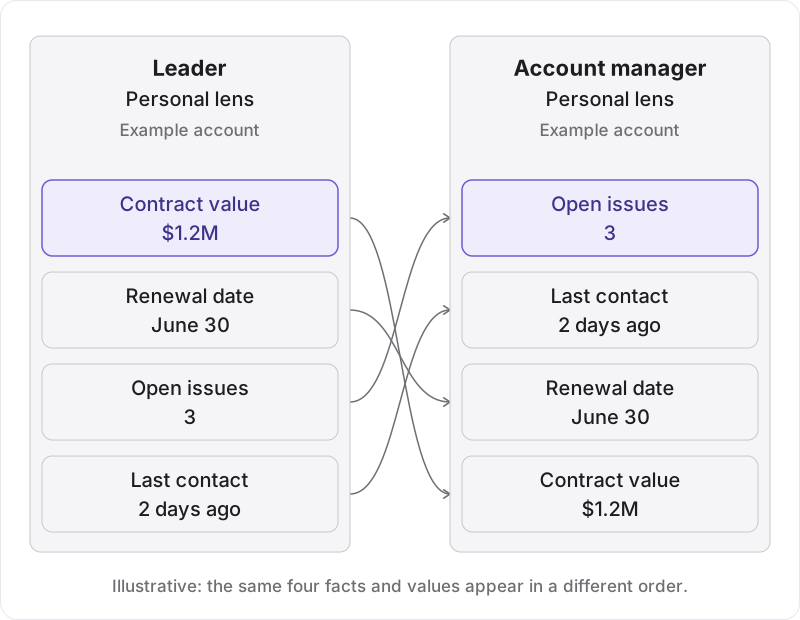
The lens is personal. What you see first depends on your job and what’s due today. A leader and an account manager open the same customer. They get the same facts in a different order.
The work happens in one place. People ask, decide and act from one surface. Agents carry the work into the other tools behind the scenes: they issue the refund in Zendesk, route the approval, update the deal in Salesforce. The five tools don’t go away. They move to the back, and most people rarely need to open them.
Your assistant reads it too. I expect every employee to get an assistant, the way they get a manager. You direct it and check its work. Because it reads the chart, it already knows the customer.
One warning. That surface has to replace trips to the other tools. If people still open the five as well, it’s the sixth tab again.
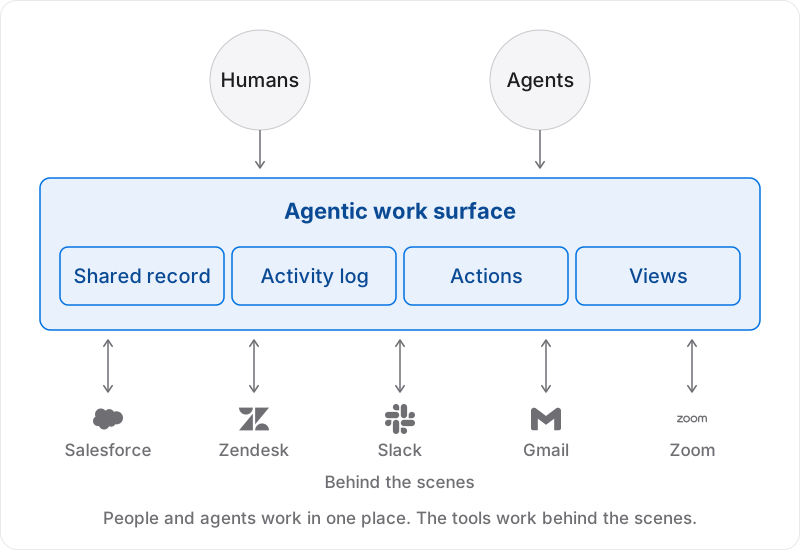
One rule keeps this honest:
A lens can change what you see first. It must never change what a fact says.
Permissions still decide which facts you’re allowed to see. But any fact two people can both see reads the same for both. If two people can open the same customer and see two different numbers, you’re back in a meeting to work out who’s right.
What I’d do this quarter
If I were leading an AI transformation in a large company, this is what I’d do in the next 90 days.
Run one 90-day test. I’d pick one team with a predictable week, such as account managers. Before the work surface arrives, I’d count places per task for a routine customer question.
Add one question to every AI funding request. “Which tools will people stop opening once this is live?” If the answer is none, I’d send it back.
Give the shared record an owner. Every system has one. The single picture of each customer usually doesn’t.
Fund the shared record first, and let team agents read from it. I wouldn’t pay each team to gather the same information separately.
Ask every vendor three things. Is what the assistant works out saved for the next person? Can I see where each fact came from? Does it act in my existing tools, or just add one more place to look?
The test
After 90 days, count again. Then ask one question:
Did places per task fall, and do people trust the answer?
If both are yes, people will keep using it without being told to. If not, it’s the sixth tab.
One question I’m still asking:
When people stop opening the five tools, who still looks inside them?
If you’re running this test, or your assistant has become a sixth tab, I’d like to hear what you’re seeing. I’m on LinkedIn and X.
continue reading
What is an enterprise agent?
An enterprise agent isn't simply a model with tools. It's a system that pursues delegated goals, takes consequential actions, works within defined authority and keeps a clear line of accountability.
The watch shouldn't be in a ready room: illegal states in agentic systems
When agents write records about the real world, the safest fix is to make the bad record impossible to write, not to repair it later. A hotel story and one small diagram.
What is AI?
Sam wants to send Elena tulips for her birthday. The flower-delivery site shows him roses first. What part of that is AI? The first of eight short posts on how AI works.